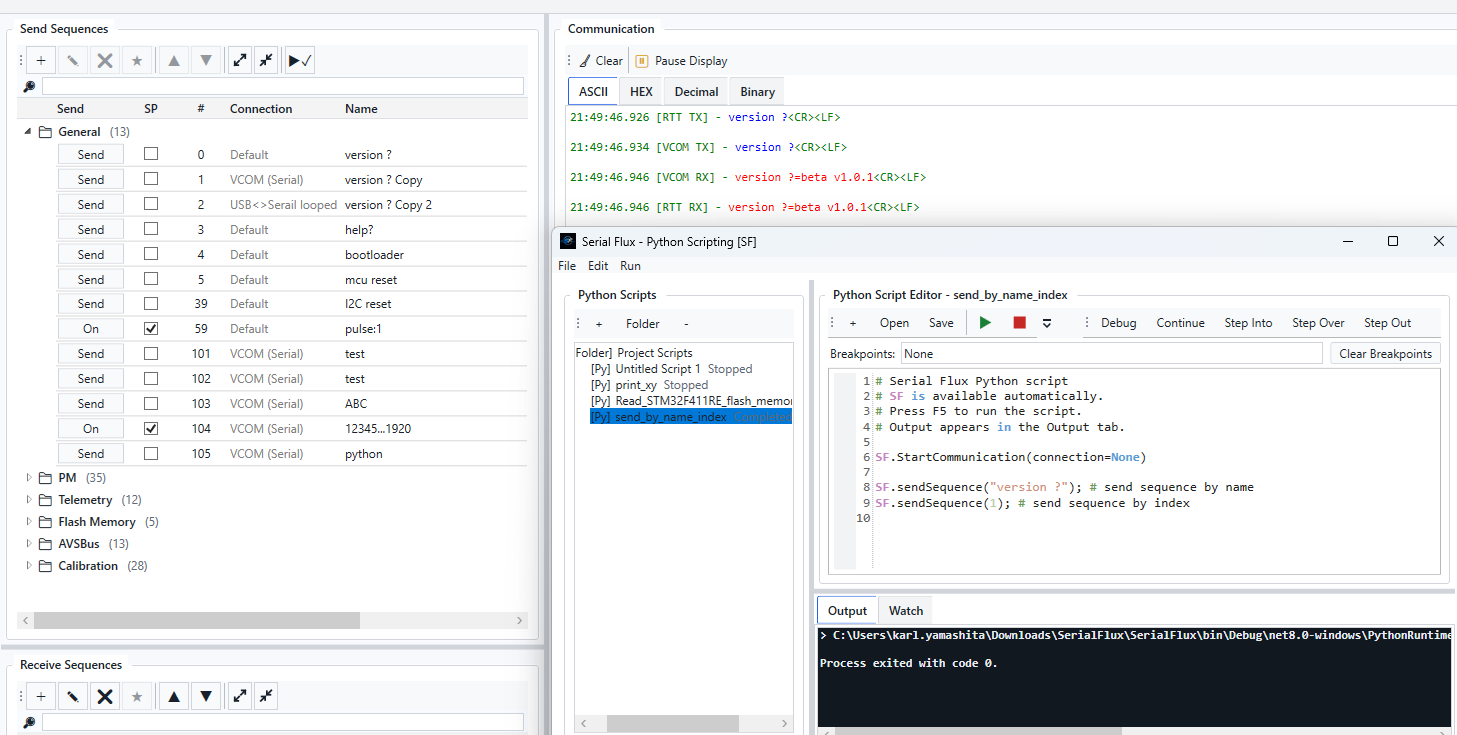
Python Scripting and Debugging
Serial Flux includes an integrated Python scripting environment for automating communication, test procedures, and repetitive device-control tasks. Scripts can interact directly with Serial Flux through the built-in SF API, allowing Python code to control communications and work with Send Sequences instead of requiring a separate external automation program.
The scripting window also provides debugging tools such as breakpoints, Continue, Step Over, Step Out, Pause, variable inspection, Locals, Watch values, and hover-value inspection. This makes it possible to develop and troubleshoot automation scripts while remaining inside Serial Flux.
Examples of Serial Flux API capabilities include:
SF.sendSequence(...)— send a configured Send Sequence by index or name.- Send data through a selected Serial Flux connection.
- Start or stop communication from a script.
- Read and react to received communication data.
- Clear or interact with the Communication output.
- Start and stop communication logging.
- Write informational, comment, warning, and error output from scripts.
- Use Python logic, loops, timing, file processing, and conditional operations to build automated test sequences.
The SF API is designed so scripts can combine normal Python programming with Serial Flux device communications—for example, sending a command, waiting for a response, evaluating the returned data, and automatically deciding what command or test step should run next.